Some people will claim Linux gaming is awesome, while others will complain that it’s broken and doesn’t work! This vast difference in experience largely boils down to the choice of distribution. As such, I only recommend three Linux distros, because they’re the best when it comes to gaming on Linux.
Theoretically speaking, if a game runs on Linux, it’ll run on all Linux distros. However, some distros will require more manual tweaking than others. For example, if you want to game on Fedora or Ubuntu—two very popular Linux distros—you’d potentially have to spend an hour (maybe more) just to install the necessary drivers, compatibility layers, and make performance optimizations.
This is where gaming distros come into the picture! They do all the technical heavy lifting for you, so you can get an almost plug-and-play gaming experience. That said, there are literally dozens of “gaming-optimized” distros, and as always, a few of them are better than the others—with these three being the best out of the bunch!
Garuda Linux—for gamers who want everything
What makes Garuda Linux great for gaming
- The Dragonized gaming edition offers a pre-configured gaming setup out-of-the-box.
- Ships with Zen kernel and ZRAM for better performance.
- Garuda Rani gives you a centralized graphical interface to download all necessary gaming software and packages.
Why Garuda Linux might not be for you
- As an Arch-based distro, it will require routine hands-on maintenance.
- Its flashy, gamer-focused aesthetic isn’t for everyone.
- Minimalists will find the distro bloated as it ships with tons of apps and packages.
Garuda Linux is an Arch-based distro specifically designed for gamers and power users. It’s easily one of the most flamboyantly designed distros out there, with the Dragonized edition sporting a neon-infused cyberpunk aesthetic, and the Mokka edition rocking the sleek Catppuccin color scheme with neon pastels and dark theming for a more calming and professional vibe. Both editions use a customized version of KDE Plasma, but you can also find support for other popular desktop environments.
As a gamer, you’d specifically be eyeing the Dragonized Gaming Edition, which offers a plug-and-play gaming experience—everything from drivers to emulators comes pre-installed and pre-configured. Of course, you are free to pick any of the other editions, but then you’d have to manually install some of the gaming-specific drivers and dependencies. Thankfully, you get access to Garuda Rani, which gives you a graphical interface to quickly find and download any gaming-specific tool you may need.
Also, as an Arch-based distro, you can expect access to the latest updates as soon as they land. It also uses the Btrfs filesystem with Snapper support that automatically takes system snapshots before an update, so you can easily roll back if something breaks. I’ve personally been daily driving Garuda Linux for the past four years, and I absolutely love it!
|
Best for |
• Windows power users switching to Linux who want a pre-built gaming system • Gamers who embrace the bold gamer aesthetic |
|
• Decent processor • 4GB RAM • 30GB storage |
|
|
Download link |
Nobara—a stable and reliable gaming experience
What makes Nobara great for gaming
- Get Fedora’s rock-solid base, pre-configured with gaming tools, codecs, and proprietary drivers.
- Includes ProtonGE for better compatibility with Windows games.
- Dedicated version for handheld gaming devices.
Why Nobara might not be for you
- Not an official spin of Fedora, so updates lag behind vanilla Fedora.
- Comes with lots of pre-installed software, which some may see as bloat.
- Limited desktop environment options with KDE Plasma as default.
Nobara is based on Fedora and optimized for gaming. As any regular Fedora user would tell you, the distro is amazing—but it’s extremely minimal, and you have to set up everything yourself. Building a gaming-centric Fedora distribution can easily become a Saturday or Sunday afternoon project. Nobara solves that by making Fedora gaming-ready right-out-of-the-box.
The distro is developed by GloriousEggroll (legal name Thomas Crider), the man behind ProtonGE—a community-maintained fork of the Proton compatibility layer that has made Windows gaming on Linux possible. Thomas is also a senior software engineer at Red Hat, the company that sponsors Fedora, so he understands the OS really well. This makes Nobara the inevitable result of combining Thomas’ two areas of expertise—Fedora and ProtonGE.
It’s worth noting that Nobara is a passion project for Thomas, who built it as a personal gaming system for himself and his dad, which is why the distro is designed to be as simple as possible to use. The official version runs a slightly customized version of KDE Plasma, but you can find it rocking vanilla GNOME as well. There’s even a specially optimized version for handheld gaming devices that replicates the Steam Deck experience.
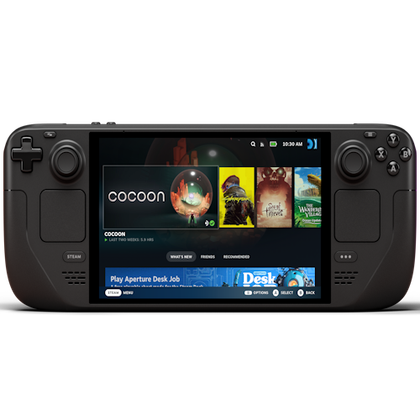
Steam Deck OLED
- Power Source
-
50Whr battery
- What’s Included
-
Console, charger, carrying case
- Brand
-
Valve
- Screen
-
7.4-inch (diagonal) LCD display
- Storage
-
512GB NVMe SSD
- CPU
-
Zen 2 4c/8t, 2.4-3.5GHz
|
Best for |
• Building a Linux-powered gaming console • Folks wanting SteamOS experience with better hardware compatibility • Gamers prioritizing stability |
|
• 2GHz quad-core processor • 4GB RAM • 64GB storage |
|
|
Download link |
Use Bazzite to build a Linux-powered gaming console
What makes Bazzite great for gaming
- Uses an immutable system that provides rock-solid stability and reliability.
- Offers different variants optimized for desktop, HTPC, or handheld gaming.
Why Bazzite might not be for you
- The immutable approach can be confusing for traditional Linux users.
- It can be harder to customize compared to standard distros.
Bazzite is a relatively new distribution, but it’s quickly become one of the most popular recommendations for folks looking for a gaming-specific Linux distro. It’s based on Fedora’s immutable variants—Fedora Silverblue (which uses GNOME) or Fedora Kinoite (which uses KDE Plasma). An immutable distro essentially means that it’s read-only at the core, and you (or anyone or any app) can’t easily modify the core OS. This makes immutable distros incredibly stable, reliable, and the perfect choice for folks who want to build a system specifically for gaming and don’t want to worry about anything breaking accidentally.
In my experience, Bazzite is one of the best distros for building a console-like experience. It comes with Steam pre-installed, and you can boot directly into Steam’s console mode. Hook up your gamepad with this setup and you’ve got yourself a Linux-powered console. Likewise, if you load apps like Kodi or Plex on it, Bazzite can also serve as a HTPC (Home Theater PC). The main downside is that, since it’s an immutable distro, you have little customization control. Furthermore, you’re limited to primarily installing apps using Flatpak—but tons of apps are available through this format, so it’s not a huge problem.
|
Best for |
• Building a Linux-powered gaming console • Gamers prioritizing stability |
|
• 2GHz quad-core processor • 4GB RAM • 64GB storage |
|
|
Download link |
Which distro should you choose?
If you always played games on your Windows PC and want a similar experience on Linux, I’d point you towards Nobara. You get excellent gaming compatibility, and when you’re not gaming, the desktop looks familiar to Windows 7 or 10. That said, if you’re seeking more of a console-like experience, then go with Bazzite! That leaves us with Garuda Linux, which I’d primarily recommend to gamers who’d also identify as power users. If you have experience following online guides, downloading mods, tweaking settings, and feel comfortable tinkering around with new software, you shouldn’t face any issues on Garuda—despite it being Arch-based.
If you’re still confused about which distro to start with, you can easily test all of them without having to leave Windows. This will give you a real sense of the overall feel of each distro, allowing you to make a more informed decision. Once you’ve found something you like, follow this guide to install Linux on your computer.